


A QGIS plugin for searching, visualizing, and analyzing NASA OPERA (Observational Products for End-Users from Remote Sensing Analysis) satellite data products, with an AI assistant for natural-language interaction.
Repository: https://
github .com /opengeos /qgis -nasa -opera -plugin License: MIT
Requires: QGIS 3.28+
About NASA OPERA
OPERA is a NASA project that provides analysis-ready data products derived from satellite observations. The project produces near-real-time and systematic global data products using optical and SAR satellite imagery.
Learn more: NASA OPERA Project
Features
Search Interface: Search NASA OPERA products by location, date range, and dataset type
Footprint Visualization: Display search result footprints as vector layers on the map
Raster Display: Visualize OPERA raster data directly in QGIS with cloud-optimized streaming
Virtual Mosaics: Combine multiple granules into seamless mosaics via GDAL VRT
OpenGeoAgent Launch: Open the OpenGeoAgent chat panel from the NASA OPERA toolbar
Multiple Datasets: Support for all OPERA products:
DSWX-HLS: Dynamic Surface Water Extent from Harmonized Landsat Sentinel-2
DSWX-S1: Dynamic Surface Water Extent from Sentinel-1
DIST-ALERT-HLS: Land Surface Disturbance Alert
DIST-ANN-HLS: Land Surface Disturbance Annual
RTC-S1: Radiometric Terrain Corrected SAR Backscatter
CSLC-S1: Coregistered Single-Look Complex
Settings Panel: Configure Earthdata credentials, display options, and search defaults
Update Checker: Check for plugin updates from GitHub
Video Tutorial
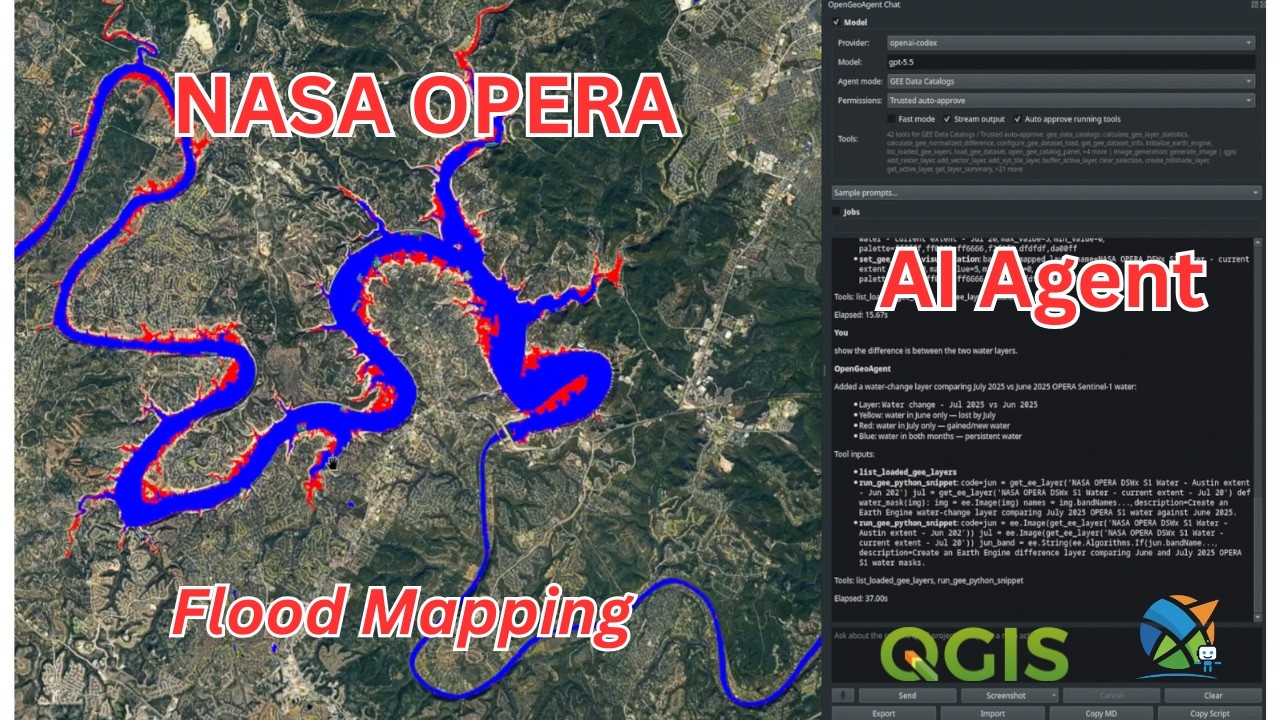
QGIS NASA OPERA Plugin + AI Agent (Full Tutorial)
Prerequisites
NASA Earthdata Account
To access NASA OPERA data, you need a free NASA Earthdata account:
Create an account
Configure your credentials in the plugin settings
Python Dependencies
Install these packages in the QGIS Python environment, or in an environment available on the QGIS Python path:
earthaccess- NASA Earthdata search and downloadgeopandas- Geospatial data manipulationshapely- Geometry operationspandas- Data analysis
Installation
Method 1: From QGIS Plugin Manager (Recommended)
Launch QGIS
Go to
Plugins→Manage and Install Plugins...Switch to the
Alltab, search forNASA OPERA, select it, and clickInstall Plugin
Method 2: Install from Source
Clone or download this repository:
git clone https://github.com/opengeos/qgis-nasa-opera-plugin.git
cd qgis-nasa-opera-plugin
Run the installation script:
Linux/macOS:
./install.shWindows/Cross-platform (Python):
python install.pyRestart QGIS
Enable the plugin:
Go to Plugins > Manage and Install Plugins...
Search for “NASA OPERA”
Check the box to enable it
Method 3: Manual Installation
Download or clone this repository
Copy the
nasa_operafolder to your QGIS plugins directory:Linux:
~/.local/share/QGIS/QGIS3/profiles/default/python/plugins/macOS:
~/Library/Application Support/QGIS/QGIS3/profiles/default/python/plugins/Windows:
%APPDATA%\QGIS\QGIS3\profiles\default\python\plugins\
Restart QGIS and enable the plugin
Usage
Basic Workflow
Open the Plugin: Click the NASA OPERA icon in the toolbar or go to NASA OPERA > NASA OPERA Search
Select Dataset: Choose the OPERA product you want to search for
Set Search Parameters:
Bounding Box: Enter coordinates manually or click “Use Map Extent”
Date Range: Select start and end dates
Max Results: Set the maximum number of results
Search: Click the “Search” button to find available data
View Results:
Show Footprints: Display the spatial coverage of search results
Display Single: Load a specific granule’s raster data
Display Mosaic: Create a virtual mosaic from selected granules
AI Assistant
The NASA OPERA toolbar includes an AI Assistant button that opens the OpenGeoAgent chat panel. If OpenGeoAgent is not installed or enabled, NASA OPERA prompts you to install it from the QGIS Plugin Manager:
Open Plugins > Manage and Install Plugins...
Search for OpenGeoAgent and click Install Plugin
Click the AI Assistant button in the NASA OPERA toolbar again
OpenGeoAgent owns the chat interface, LLM provider settings, and AI dependency installation.
Settings
Access settings via NASA OPERA > Settings:
Credentials: Configure your NASA Earthdata username and password
Display: Customize footprint styles and default colormap
Advanced: Set default search parameters and cache options
First-Time Authentication
When you first run a search, the plugin will authenticate with NASA Earthdata:
If you haven’t configured credentials, earthaccess will prompt for login
Credentials are stored in
~/.netrcfor future useYou can also configure credentials in the Settings panel
Development
Project Structure
qgis-nasa-opera-plugin/
├── nasa_opera/                 # Plugin source code
│   ├── __init__.py            # Plugin entry point
│   ├── nasa_opera.py          # Main plugin class
│   ├── metadata.txt           # Plugin metadata
│   ├── deps_manager.py        # Dependency checks
│   ├── dialogs/               # UI widgets
│   │   ├── opera_dock.py      # Main search interface
│   │   ├── settings_dock.py   # Settings panel
│   │   └── update_checker.py  # Update checker dialog
│   └── icons/                 # Plugin icons
├── install.py                 # Python installation script
├── install.sh                 # Bash installation script
├── package_plugin.py          # Python packaging script
├── package_plugin.sh          # Bash packaging script
├── README.md                  # This file
└── LICENSE                    # MIT License
Packaging for Distribution
To create a distributable zip file:
python package_plugin.py
# or
./package_plugin.sh
This creates nasa_opera-{version}.zip ready for upload to the QGIS Plugin Repository.
Contributing
Contributions are welcome! Please feel free to submit a Pull Request.
Fork the repository
Create your feature branch (
git checkout -b feature/AmazingFeature)Commit your changes (
git commit -m 'Add some AmazingFeature')Push to the branch (
git push origin feature/AmazingFeature)Open a Pull Request
License
This project is licensed under the MIT License - see the LICENSE file for details.
Acknowledgments
NASA OPERA Project for providing the data products
earthaccess for NASA Earthdata access
OpenGeoAgent for the QGIS chat panel
leafmap for inspiration on the GUI design
The QGIS community for the excellent GIS platform
Support
Bug Reports: GitHub Issues
Feature Requests: GitHub Issues
Documentation: GitHub Wiki
Acknowledgments
NASA OPERA Project for the data products
earthaccess for NASA Earthdata access
litellm for unified LLM provider access
leafmap for GUI design inspiration
The QGIS community for the GIS platform